Understanding Network Devices

How the Internet Reaches your Home/Office?
Answer: ISP (Internet Service Provider) delivers the internet to your location. It can be achieved by many ways:-
Cable Internet: TV Cable lines (coaxial cable).
Fiber Optic: Glass fiber cables (it’s fastest).
Wireless: Radio signals from a tower.
Satellite: Signals from space.
Short Flow: The ISP provides the connection through physical infrastructure, the modem translates it, the router manages and distributes it, and your devices are connect to the internet.
There are many fundamental Network devices that make this kind of flow possible, let’s understand those devices.
1. Modem (Modulator-Demodulator): Converts digital signals into Analog signals (and vice versa), it’s the bridge between home network and the internet.
2. Router: Directs traffic between the local network and the internet, it creates and manages home/office network. It connects multiple devices to the internet using one public IP, it is achieved with NAT (Network Address Translation).
3. Firewall: Firewall Manages the Security for the Network, it also monitors and controls inbound and outbound traffic. Firewall filters traffic based on security rules.
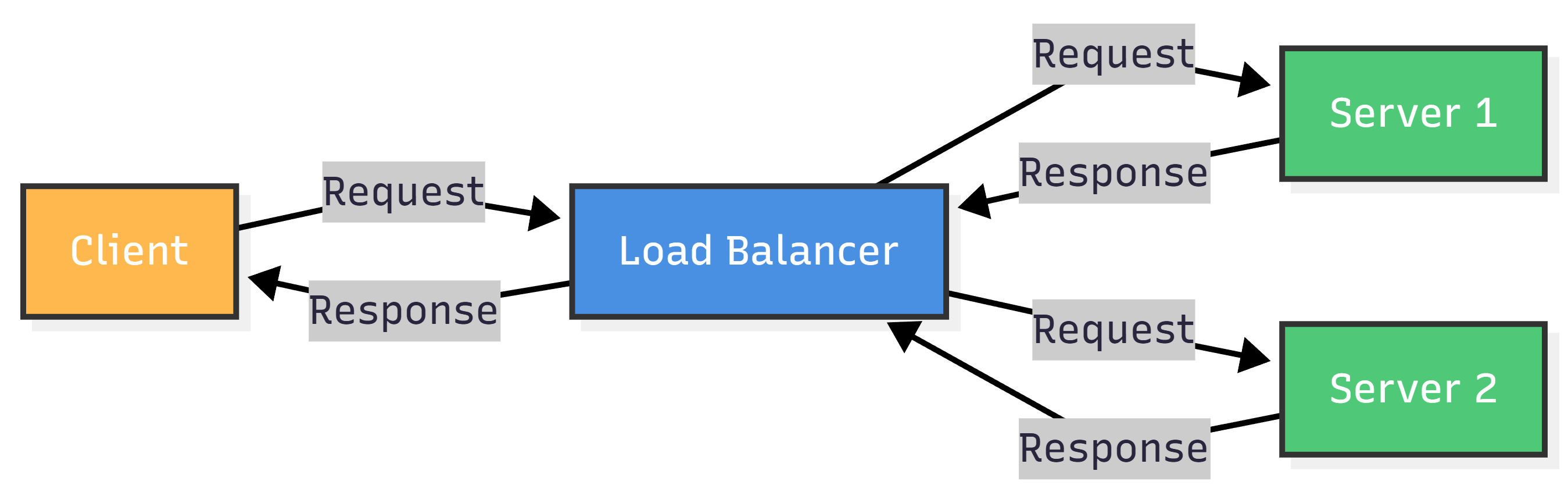
4. Load Balancer: Distributes incoming network traffic across multiple servers to prevent any single server from being overwhelmed.
Key functions: Receives all incoming requests, distributes requests across multiple serves, monitors server health, sends traffic only to healthy servers, overall improves performance and reliablity.
Real World Flow
When you type “amazon.com” into the browser:
1. Browser Sends Request, ip 192.168.1.100 (private/ local).
2. Home Router Receives request from the laptop and uses NAT to translate private IP to public IP: 73.45.128.92.
3. Modem Converts digital signals into analog signals that ISP understands.

4. DNS Server Recieves the query and responds with the IP address of amazon.com.
5. Routers Reaches closer to Amazon’s server using BGP protocol.
6. Amazon’s Load Balancers Distributes the request to least-busy server.
7. Amazon’s Web Server Processes the request and responds with HTML/CSS/JS.
8. The response from the server also travels back through the same route it came from.
9. Router Reognizes the NAT session and delivers the packet to the laptop (192.168.1.100).
10. Browser Assembles the complete webpage and Renders Amazon’s Homepage.
Questions
1. What is the key difference between Switch and Hub?
Hub: Device that Broadcasts everything to everyone (shouting in a crowded room).
Switch: Device that sends data only to the intended recipient (like whispering directly to one person).
2. Network devices operate on which layer of TCP/IP Suite?
Router Work: Internet Layer
Modem: Network(mostly) Layer + Internet Layer
Load Balancer: Transport Layer (or Application Layer)
Proxy/WAF(Web Application Firewall): Application Layer
Conclusion
The next time you visit a website, you understand exactly what’s happening behind the scenes which components are responsible for what part of the internet from modem to load balancers.
At it’s core, the Internet embodies a perticular philosophy about how systems should be designed, distributed, fault tolerant and evolutionary.
References
1. SimiTech: Types of Network Devces and Their Roles